
Local Accounts Only
Password reset works only for local Windows accounts — the ones stored directly on your computer.
Local accounts are offline.
This is why they can be safely reset without affecting cloud data or Microsoft services.
Microsoft Accounts
If your Windows login uses a Microsoft email (Outlook, Hotmail, Live, Xbox, Office etc.), the password is stored online.
These accounts must be recovered only through Microsoft’s official system:
https://account.live.com/password/reset
We follow Microsoft’s security rules.
Cloud-managed accounts aren’t modified in any way. If support for them appears in the future, it will be added safely and officially.
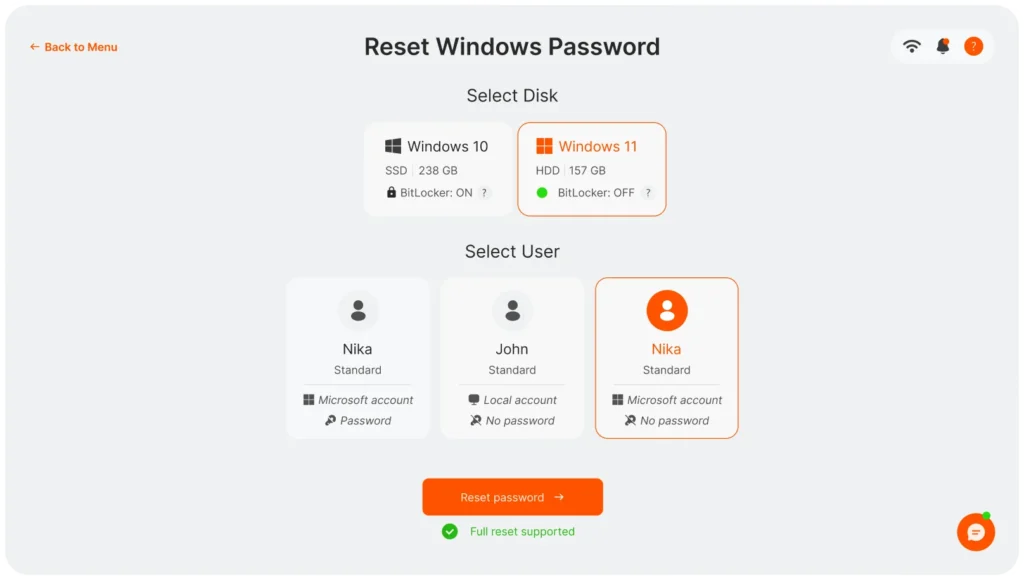
Select Your Windows Installation
Choose the Windows installation you want to work with.
Only drives containing a real Windows system will appear here.
Tip: If you see several systems, select the installation you actually use.
Choose the User
You will now see all detected local users on that Windows installation.
Pick the account whose password you want to reset.
Applying the Reset
After confirmation, the password for the selected account will be completely removed.
You’ll set a new one later inside Windows — we don’t create new passwords automatically.
Safety First:
A secure backup is created before any changes are made.
Safety and Restore Option
If something doesn’t behave as expected (rare, but possible), simply click Restore Backup.
This fully reverts the reset and brings the system back to its previous state.
We added this step because your system integrity and data safety matter.